BT Parental Controls help keep your children safe online. Once activated, all devices connected to your BT Hub will have content filtered to a restriction level that you set. These filters will also apply if you use your BT ID to log in to BT Wi-fi.
BT Parental Controls is free to BT Broadband customers.
There are two ways to set up BT Parental Controls. It only takes 5-10 minutes.
Setting up a new Hub
When you set up your new Hub, you'll be guided through the installation. During the installation, you'll be given the option to set up BT Parental Controls. Just follow the instructions.
Existing customer with a BT Hub
You can access BT Parental Controls through your My BT account.
- Log in or sign up to My BT with your BT ID.
- Scroll down to and click on the Manage your extras button.
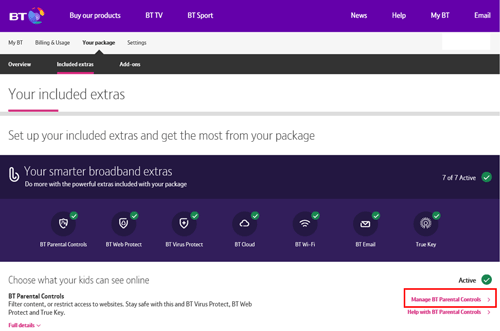
- Scroll to the 'BT Parental Controls' section and click the Manage BT Parental Controls link.
- Activation will occur automatically, and you'll be added to the 'Light Filter'. It'll take about a minute to complete the setup.
- You'll then receive a confirmation screen, and your filters will be live within two hours.
Non-BT hub or router
It's preferable that you use a BT Hub. However, if you don't have one, you can still use BT Parental Controls, but you must ensure you are using BT DNS settings. You may need to check the instructions that came with your router for how to do this.
How can I tell if my Parental Controls are active?
To check if your BT Parental Controls are active:
- Log in to your My BT account
- Scroll down to and click on the Manage your extras button
- On the My Security management page, if the slider in the 'BT Parental Controls' panel is set to 'On', BT Parental Controls are active. Just click on the slider to quickly switch BT Parental Controls on or off

Any changes you make can take up to two hours to take effect. If two hours have passed and BT Parental Controls are still not active, then try rebooting your hub.
To check if your BT Parental Controls are active:
- Log in to your My BT account
- Scroll down to and click on the Manage your extras button
- On the My Security management page, if the slider in the 'BT Parental Controls' panel is set to 'On', BT Parental Controls are active. Just click on the slider to quickly switch BT Parental Controls on or off
Once you have set up the filters, it may take up to two hours for them to activate. However, you can still log in and customise any of your BT Parental Control settings during this time.
I've rebooted or reset my hub. Do I need to set up BT Parental Controls again?
No, your BT Parental Controls settings are linked with your account. If you reboot, restart, or reset your hub, all your settings will remain intact.