Setting filter times
Turn off your filter levels for a period of time:
- Log in to My BT with your BT ID
- Scroll down to and click on the Manage your extras button followed by clicking on Manage BT Parental Controls
- Select Manage Settings under BT Parental Controls and choose the Set filter times tab
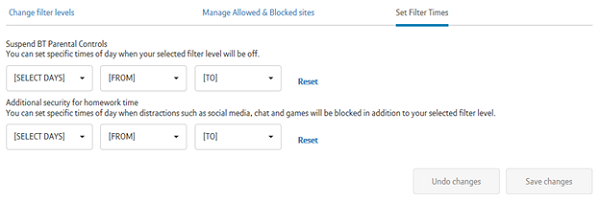
- Providing your BT Parental Controls are switched on, your filters are on by default 24 hours a day, 365 days a year. However you can set a period of time when your BT Parental Controls are disabled. During this time, protection against inappropriate content will be disabled on all devices that are connected through your Hub
- To turn off filters simply choose the days from the drop down then select a start time for the filters to go off and an end time so the filters become active again
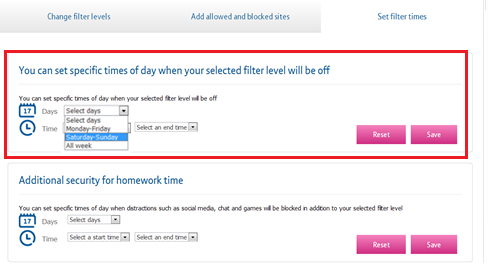
- After you have selected the days and times, click Save changes and your settings will be saved, you'll see a confirmation message

Homework time is an additional layer of protection over and above your day to day filters. It allows you to set the additional filters to come on and off automatically during the times that you choose. It will also block social networking, gaming and cheating websites.
Add additional filters for homework time:
- Log in to My BT with your BT ID
- Scroll down to and click on the Manage your extras button followed by clicking on Manage BT Parental Controls
- Select Manage Settings under BT Parental Controls and choose the Set filter times tab
- By setting homework time filtering you're keeping your current filter levels with additional blocking of online gaming, social media and school cheating sites
- To activate homework time filters simply choose the days from the drop down then select a start time for the additional homework filters to start and an end time
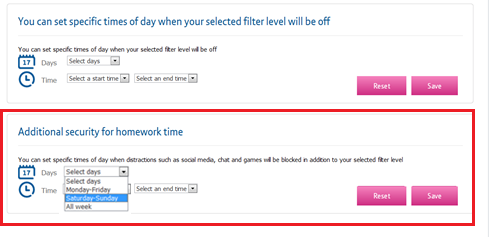
- After you have selected the days and times, click Save changes and your settings will be saved, you'll see a confirmation message
Can I add/remove categories during homework time?
No, you can't add or remove categories for homework time, but you can activate these filters on the management page.